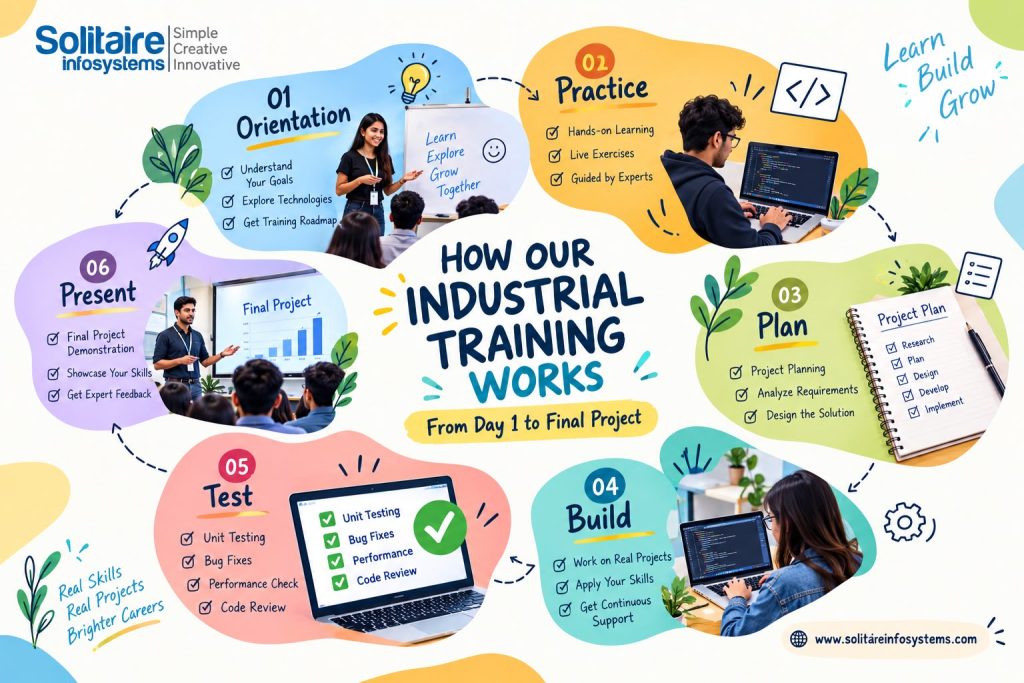
Industrial Training Process: From Day 1 to Final Project
Request a Quote !

Request a Quote !

Request a Quote !

Blogs

How Our Industrial Training Works: From Day 1 to Final Project

  • By: admin
  • date: Oct 17, 2026
Blog Image

Most students walk into industrial training with the same few questions. What actually happens on the first day? How long before I write real code? Who picks my project? And what am I expected to show at the end?

Fair questions — and a lot of training programmes stay vague about them until you’ve already joined. So here is how industrial training at Solitaire Infosystems runs, stage by stage, from your first day to your final project presentation.

One thing worth knowing upfront: the pace changes with your technology, your starting level and the length of your training. The order of the stages doesn’t.


The Industrial Training Process at a Glance

The industrial training process moves through six stages:

  1. Day 1 orientation — choose your technology, set goals and set up your tools
  2. Fundamentals — core concepts, practised hands-on from the start
  3. Practical tasks — small assignments with a clear, working output
  4. Project planning — define the problem, scope and technologies
  5. Project development — build one piece at a time, with reviews along the way
  6. Testing, documentation and presentation — check it, write it up and explain it

Here’s what each stage looks like in practice.


Stage 1: Day 1 — Orientation, Goals and Setup

Day 1 is less about coding and more about direction. You confirm the technology you’re training in, talk through what you already know, and get clear on what you should be able to build by the end.

It’s also the day to sort out the practical side: which software you need installed, how your work will be reviewed, and who to go to when you’re stuck.

Be honest about your starting point. A B.Tech student who has already built a couple of websites and a BCA student opening a code editor for the first time shouldn’t start in the same place, and pretending otherwise only slows you down later.

The plan itself depends on the domain. Web development usually starts with page structure, then frontend, then backend and databases. Data analytics starts with getting data clean long before anyone talks about dashboards.


Stage 2: Fundamentals, Learned by Doing

Once the direction is set, you build your foundation — but not by reading notes for two weeks. Each concept is introduced and then practised straight away through guided exercises.

The goal isn’t to memorise syntax. It’s to understand when and why you’d use something. Learning what an SQL JOIN is takes ten minutes; knowing which join to use when your report suddenly shows duplicate rows takes practice.

Depending on your track, this stage means writing and reading code, working with databases, building layouts, analysing small datasets, or learning the basics of software testing or networking.

A useful habit to build here: when something breaks, don’t just copy the fix. Find out why it broke. That habit will matter more in Stage 5 than almost anything else you learn.

Still deciding whether industrial training is right for you, or which domain to choose? Our Industrial Training Guide for Students covers preparation and options in more detail.


Stage 3: Small Practical Tasks

Next, the exercises start to look like real work. Instead of isolated concepts, you get small tasks with a clear output.

A web development trainee might build a responsive page, connect a contact form and store the submissions in a database. A data analytics trainee might take a messy spreadsheet, clean it, spot a pattern and present it in a simple chart.

These tasks teach the working habits every project depends on — breaking a job into steps, following a requirement exactly, troubleshooting on your own before asking, and checking your output before calling it done.

They also show you, quite quickly, which concepts you’ve really understood and which ones you only thought you had.


Stage 4: Planning Your Student Project

This is where training gets a clear target. Before writing any project code, you plan it, and a good plan answers five questions:

  • What problem does it solve? Be specific. “A website” isn’t a problem; “a way for a small clinic to take appointment requests online” is.
  • What’s the scope? Decide which features are essential and which can wait. Most student projects that go wrong try to do too much.
  • Which technologies? Pick tools that suit the project and your skill level, not the ones that simply sound impressive.
  • What are the tasks? Break the build into pieces you can finish and check one at a time.
  • How will you demonstrate it? Know what “done” looks like before you start.

Typical projects include a student management system, a sales dashboard, a responsive business website, or a test plan for an existing application. The right project is the one you can build properly and explain confidently.

You can see the kind of work trainees build on our Student Projects at Solitaire Infosystems page.


Stage 5: Building the Project, One Piece at a Time

Development is where most of the learning happens — and, honestly, most of the frustration too.

The approach is simple: build one component, check that it works, then move to the next. A web application might start with its page structure, then interactive features, then the database connection. A data project starts with collecting and cleaning data, then analysis, then the dashboard.

Your work is reviewed along the way, not just at the end. That matters. Finding out your database design has a problem is useful in week two and painful the night before submission.

Expect things to break. An afternoon spent on one bug isn’t wasted if you come out understanding why it happened.


Stage 6: Testing, Documentation and Final Presentation

A project isn’t finished just because the main feature works on your laptop. Before you present, you test it properly. Does every feature do what it should? Is the data accurate? Does the interface make sense to someone who didn’t build it? Does it meet the requirements you set in Stage 4? Fix what you find, then test again.

Then comes documentation. A solid project report usually covers:

  • Project title and objective
  • Problem statement and scope
  • Technologies and tools used
  • Main features, with screenshots or results
  • How it was tested, and any known limitations
  • What you learned

Finally, you present. Expect questions: why you chose this approach, what went wrong, what you’d do differently. Students who genuinely built their project usually find this the easiest part, because they can explain every decision.

Your finished project can then go into your portfolio or come up in interviews. Just describe your own contribution accurately and leave out anything confidential.


What You Take Away From It

The technical skill is the obvious part. The less obvious part is everything around it: turning a big job into small ones, debugging without panicking, explaining your work to someone else, and having a finished project to point to when someone asks, “So, what have you built?”

How much you get out of it still depends on you — how regularly you practise, how many questions you ask, and how seriously you treat the project.


Who Is Industrial Training For?

It suits students in BCA, MCA, B.Tech, diploma and other IT-related courses who need practical training as part of their studies, as well as fresh graduates who want hands-on experience and a real project before applying for jobs.

Choose your domain based on your course, your interests and the kind of role you want — not on what your friends picked.


Frequently Asked Questions


What happens on the first day of industrial training?

Day 1 is orientation. You confirm your technology, discuss your current skill level, set learning goals, install the tools you need and understand how your work will be reviewed.


Does industrial training at Solitaire Infosystems include a project?

Yes. Training moves from fundamentals and practical tasks to a student project that you plan, build, test, document and present. The size of the project depends on your domain and training duration.


When does project development start?

After the fundamentals and practical tasks. Students who already know the basics of their technology usually reach the project stage sooner.


Why are testing and debugging important in a student project?

Testing shows whether your project works as intended; debugging finds out why it doesn’t. Being able to explain how you tested your work also makes your final presentation much stronger.


What should a final project report include?

The objective, problem statement, scope, tools used, main features, screenshots or results, testing details, known limitations and what you learned.


Can I add my industrial training project to my portfolio?

Yes, as long as you describe your own contribution honestly and remove any confidential information.


How do I choose the right training domain?

Match it to your course, your current skills and the kind of role you want. If you’re unsure, talk it through with our team before you join.


Planning Your Industrial Training?

If you’re about to start industrial training, the most useful next step is to look at the domains on offer and ask how the project stage works for the one you’re interested in.


See the current training options on our internship page or visit us at C-110, Phase 7, Industrial Area, Mohali, between 9:00 AM and 6:30 PM to talk it through in person.

About the Author

Comments